 Hotline
We tested "just use a timer in Shortcuts"
You don't need an app to ring an alarm from a notification: a Shortcuts automation can just start a 1-second timer. That works. We wanted to know what it does once it rings, so we tried it on a real iPhone.
Everything here is from an iPhone SE running iOS 27.0.1, with the shortcuts built by hand in the Shortcuts app. The comparison is on its own page, Hotline or a timer in Shortcuts, and we keep that one up to date. This post is what we found along the way.
The timer works, and says "Timer"
Start Timer, set to 1 second, rang 1.5 to 2.1 seconds after each notification, through Silent and Focus, as loud as any alarm. For one trigger you can't miss, it does the job.
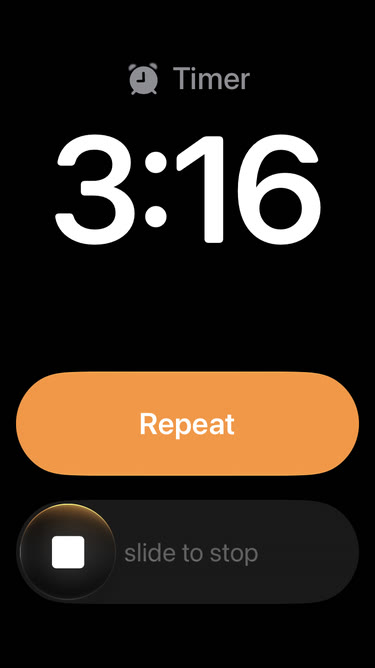
What it can't do is tell you why it's ringing. Start Timer has no label, so the screen says "Timer" whether it was your doorbell or your boss. There's no snooze, only Repeat, and every timer uses the one sound set in the Clock app.
Two runs started two timers. They rang as two identical "Timer" banners, and we stopped them one at a time. Five notifications 2 seconds apart started five.
Your shortcut can't see it ringing
The obvious fix for stacking is to check whether a timer is already going. Clock has an action for that, Get Current Timer. While a timer was ringing, it returned 0 seconds, the same as when there was no timer at all.
Stopping it from Shortcuts didn't work either. Cancel Timer ran without an error, and the timer kept ringing. Cancel Timer cancels a timer that's still counting down, not one that's going off.
Create Alarm carries the message, but rings late
Create Alarm (Add Alarm in the action list) makes a real Clock alarm, and its label carries the message. On the Lock Screen it shows the first two lines, the same as Hotline's alarm.
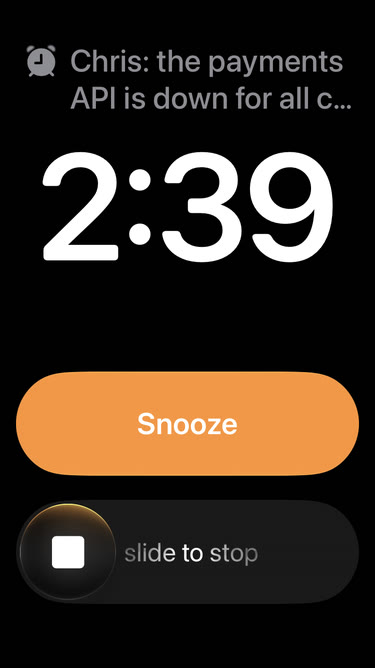
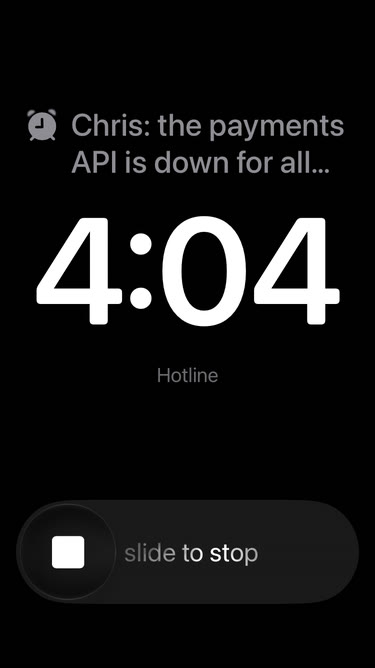
The message isn't the problem; the timing is. The alarm's time is a time of day, to the minute, with no seconds and no "in 1 minute" (that stopped our run with "Incomplete time"). So the shortcut has to work out the time itself, and each way of doing that costs something:
- The current minute rings tomorrow. Set it for the minute you're in and it rings 24 hours late.
- The next minute is up to a minute late. A message at 3:07:05 rings at 3:08:00, 55 seconds after it arrived.
For something that has to ring, neither is a small error. A timer rang about 2 seconds after the notification, and Hotline's alarm 3 to 5.
Each alarm also stays in the Clock app afterwards. And turning it off doesn't silence it: Toggle Alarm reported "Your 3:08 PM alarm is now Off." while the alarm went on ringing. Delete Alarms does stop it, after asking "Allow … to delete 1 alarm?" every time, until you turn on Allow Deleting Without Confirmation in Settings › Apps › Shortcuts › Advanced and tap the Delete Always button it adds to that prompt.
Nothing rings forever
We left a timer and a Clock alarm ringing. Each went quiet after exactly 15 minutes: the phone's log gives both a maximum duration of 900 seconds. The alarm stays on screen, silent, until you stop it. Hotline's alarms have the same limit, so a channel set to ring longer starts a fresh alarm every 15 minutes, for up to 2½ hours.
Urgent reminders: close, but not from Shortcuts
The Reminders app can mark a reminder Urgent, which rings an alarm with the reminder's title. That's the closest thing iOS has to what Hotline does. A shortcut can't set it, though: neither New Reminder nor Edit Reminder has an Urgent option. And when we switched it on by hand, Reminders explained that urgent alarms ring only on the device Find My uses as your location. For us, that was a different device from the iPhone we were testing on. Once we made the test iPhone that device, the urgent reminder rang about 5 seconds after its time, with its title, snooze and stop, and the same 15-minute limit as the timer.
The part you live with: changing what rings
Getting one alarm to ring is the easy part. The work starts the second week, when you want your manager's messages to ring but not the team chat, the doorbell only at night, and the server alert only when it fires three times in ten minutes.
In Shortcuts, each of those is another If block, or another automation, with its own copy of the counting and cooldown logic, kept in a file or, since iOS 27, in the shortcut's own storage. Changing "only after 10 PM" means opening the shortcut on your phone and finding the right block.
In Hotline, one automation sends every notification in, and each source is a channel: its apps, people, words and hours, and its own sound, snooze and countdown. Adding a source is adding a channel. Pausing one for the weekend is a switch.


The bigger difference is checking a rule before you rely on it. A channel shows which of your recent notifications it would have rung for, as you edit it ("Would ring for 3 of 23"), and History lists every notification with what happened to it. In Shortcuts, a log like that is another file your shortcut writes on every branch; without one, you find out a rule is wrong when it should have rung and didn't.
Both do tell you when something breaks. When a step of our DIY automation failed with the iPhone locked, Shortcuts posted a notification with the automation's name and the error, and nothing rang. Hotline sends a notice too, for example when Alarms aren't allowed. Either way it's an ordinary notification, so it's only as loud as one.
What Hotline does differently
The ringing screen isn't the difference. What happens around it is:
- It rings within seconds of the notification, with the message on it, and more notifications for the same channel don't start a second alarm.
- A channel can count down before it rings, with the whole message and Cancel on the Lock Screen, so you can call it off.
- Sound, snooze, how long it rings (15 minutes to 2½ hours) and vibrate before the sound, per channel.
- Turn all of Hotline off, and back on, from Control Center or the Lock Screen: for a meeting, a film or a night off, with every channel kept as it was. History still shows what would have rung. A DIY automation is switched off in the Shortcuts app.
- Your channels back up to iCloud and come back on a new iPhone; a DIY setup is spread across shortcuts and files.
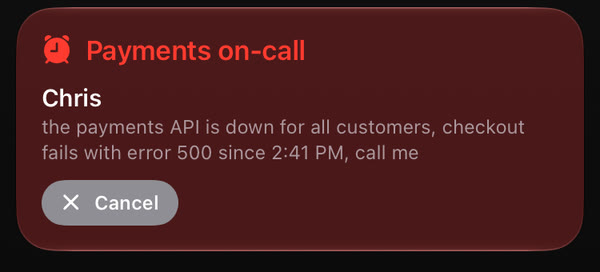
So, should you just use a timer?
If one trigger needs to wake you and you don't mind a screen that says "Timer", yes. It's free and it works. If you already have a shortcut that decides what matters, keep it and end it with Hotline's Ring Hotline Channel action instead of Start Timer, to get the message on the alarm.
Hotline is for when you'd rather not build and maintain the rest: one channel per source instead of a growing shortcut, rules you can check before they matter, and a record of what happened.
All the details are on Hotline or a timer in Shortcuts. To compare Shortcuts against Emergency Bypass and Focus allow lists, see Do you need Hotline?.